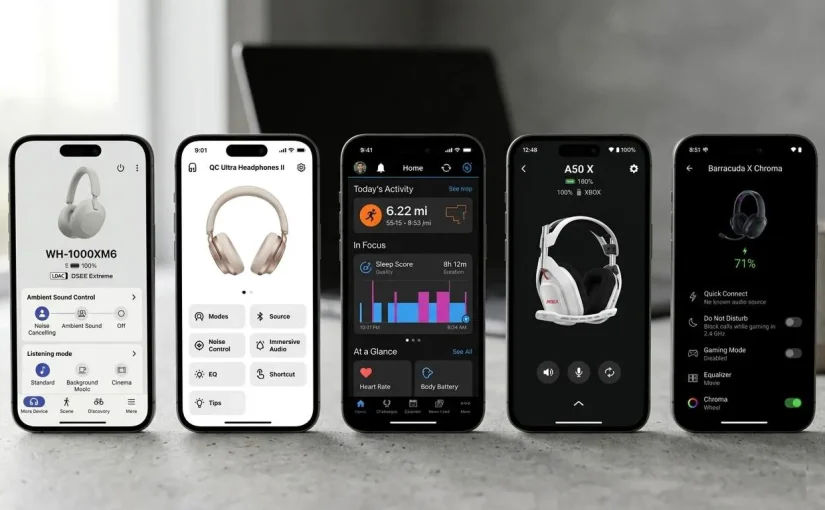
A pair of $400 headphones and a pair of $80 headphones can sound nearly identical on a spec sheet. What increasingly separates them is the app that sits between the hardware and the listener. The equalizer that actually does something useful. The firmware update that arrives without friction. The dashboard that turns raw sensor data into a decision a person can act on. Companion software used to be an afterthought bundled with the box. In 2026, for most premium consumer electronics, it is the product.
This shift shows up clearly in the numbers. Global wearable device shipments reached 611.5 million units in 2025, a 9.1% year-over-year increase. IDC projects the market will grow to roughly 625 million units in 2026, even as memory-related supply constraints push average selling prices upward. Growth at that scale means more devices competing for the same shelf space. When hardware specs converge, the companion app becomes one of the clearest ways a brand can still stand out. Service and subscription revenue tied to connected devices is also growing faster than hardware sales themselves across several categories — another sign that the software layer is no longer secondary to the sale.
In this post, we will discuss how five major consumer electronics brands are approaching this software layer in 2026: Sony’s Sound Connect, the Bose app, Garmin Connect, Logitech’s G HUB and Logi Options+ ecosystem, and Razer Synapse 4.
1. Why Companion Apps Have Become a Core Product Decision
The economics of consumer electronics have shifted. Hardware margins compress with every product cycle as components commoditize. Software, meanwhile, is increasingly where brands differentiate, retain users, and build recurring engagement. That’s why companies that once shipped simple Bluetooth pairing utilities now run dedicated software teams whose primary mandate is the companion app experience.
Three forces are accelerating this shift in 2026:
- Maturing AI. On-device and cloud AI now delivers genuinely useful personalization — adaptive sound profiles, dynamic training plans, and behavior-aware automation that would have felt like gimmicks five years ago.
- Open platform standards. Apple HealthKit, Google Health Connect, and Matter/Thread interoperability have pushed brands toward more open, integration-friendly architectures, raising the baseline for what “good” companion software looks like.
- Hardware-as-a-platform. A single app now manages a brand’s full device portfolio across price tiers, the default model rather than the exception — which means companion apps need to scale gracefully across very different device capabilities and user needs.
The result is a market where the companion app is a frontline product decision, not a back-office engineering task. Every brand profiled here has made deliberate, defensible choices about how to build that layer.
2. Sony Sound Connect: Depth of Audio Personalization
Sony’s companion app — consolidated under the Sound Connect name in October 2024 after years as Headphones Connect — is built around a single core idea: audio should adapt to context, not just to manual settings. Its signature feature, Adaptive Sound Control, uses the phone’s location and motion data to automatically shift between noise cancellation, ambient sound, and focus modes depending on what the user is doing — walking, commuting, sitting at a desk. The app learns behavioral patterns over time and applies the right profile proactively, rather than asking the user to remember to switch modes. That’s a meaningfully different design philosophy than a static settings menu.
Sony’s most distinctive feature is 360 Reality Audio, a personalization flow that has users photograph their own ears to generate an individual head-related transfer function (HRTF) profile for spatial audio. Few competitors attempt this level of individualized calibration.
The app also supports a granular 10-band equalizer, codec switching (including LDAC for high-resolution streaming), and multi-device profile memory for users with several Sony products. A listening-history feature compares accumulated sound pressure exposure against World Health Organization safe-listening guidelines, extending the app’s value beyond audio tuning into everyday hearing health. Combined, these features make Sound Connect one of the most feature-dense companion apps in the audio category — and a useful reference point for what “deep personalization” looks like when a brand commits to it.
3. Bose App: Designed for Continuity
Bose’s approach centers on a different principle: consolidate rather than fragment, and treat long-term reliability as a feature in its own right. What used to be separate tools for headphones, speakers, and soundbars has been merged into a single Bose app spanning the company’s full audio lineup.
The May 2026 launch of its Lifestyle Collection reinforced that direction with a guided, multi-device onboarding flow and shared Wi-Fi credentials across products.
The app’s feature set centers on a small number of well-defined pillars. Modes-based noise control lets users switch between Quiet Mode for full cancellation and Aware Mode (with ActiveSense on select QuietComfort products) for automatically blended ambient sound. A consolidated music layer surfaces Spotify, Amazon Music, Pandora, SiriusXM, iHeartRadio, and TuneIn directly inside the app, with one-touch presets mapped to physical buttons. Multi-room and stereo-pairing controls let two or more Bose products play synchronized or independent content from a single interface. Background firmware updates download automatically and install only when the user is ready.
Bose’s clearest long-term commitment to this philosophy came into view with its handling of the legacy SoundTouch platform. The company announced in October 2025 that it would retire SoundTouch’s cloud backend. It then extended the transition window and shipped an updated app that preserves local playback, multi-room grouping, and basic controls entirely without the cloud, alongside an open SoundTouch API for independent developers.
For any brand managing a hardware lifecycle that spans a decade or more, that’s a notable example of designing a graceful offramp rather than simply shutting a platform down — exactly the kind of long-horizon thinking companion software increasingly requires.
4. Garmin Connect: The Health-Data Reference Point
Garmin Connect occupies a different category entirely — closer to a health and performance analytics platform than a simple device companion. It remains the clearest example of how deep a companion app can go when health and fitness sit at the center of the value proposition.
The table below summarizes Garmin Connect’s core feature pillars, including the additions from its February 2026 software update:
| Feature | What It Does | Notable Depth |
| Body Battery | Continuous 5–100 energy-reserve score derived from HRV analysis | Updates throughout the day, not just each morning |
| Training Readiness | Composite 0–100 score combining sleep, HRV status, recovery time, training load, stress, and Body Battery | Used to guide whether a hard session or rest day fits the day |
| Garmin Fitness Coach | Structured cardio plans built from training history and current fatigue level | More than 25 activity types with heart-rate-based intensity targets |
| Sleep Alignment | Visualizes how consistently sleep timing matches circadian rhythm over time | Introduced February 2026; aims to reduce “social jetlag” |
| Gear Tracking | Logs usage across running shoes, bike components, skis, and more, tied to specific activities | Expanded database with gear collections for grouped equipment |
| Accessibility suite | Spoken watch faces, color-blindness display filters, hourly audio alerts | Added in the February 2026 update to close long-standing accessibility gaps |
| Varia voice alerts | Audible alerts for approaching vehicles via paired Varia radar | Adds a voice layer alongside existing haptic and visual warnings |
The company positions Body Battery and Training Readiness as directional wellness indicators useful for spotting trends, not as diagnostic-grade measurements. That’s a useful model for any product team building consumer health features: clear communication about a metric’s limits tends to build more durable user trust than overstated precision claims.
Garmin’s rollout strategy is also instructive from an architecture standpoint. The richest new features in the February 2026 update target the company’s newest hardware platforms — the Fenix 8 family, Venu X1, Venu 4, and Forerunner 970/570 — while older but still-supported devices continue receiving stability updates. For a brand whose hardware spans a decade of price points, that tiered approach reflects a deliberate tradeoff between concentrating engineering effort on the newest platforms and maintaining broad device support.
5. Logitech: One Brand, Two Companion App Philosophies
Logitech offers a distinctive case study in this benchmark. Rather than building one companion app for every audience, it maintains two, each purpose-built for a different use case. G HUB serves the gaming line (G-series mice, keyboards, headsets) with low-level hardware control. Logi Options+ serves productivity devices (MX-series mice, keyboards, webcams) with cross-platform workflow features. The two are not interchangeable, and each is genuinely well-suited to its audience.
| Capability | G HUB (Gaming) | Logi Options+ (Productivity) |
| Target hardware | G-series mice, keyboards, headsets, speakers | MX-series mice, keyboards, webcams, lights |
| Onboard memory profiles | Up to 5 full profiles stored on-device | Cloud-based sync, no onboard storage needed |
| DPI stage tuning | Up to 5 stages with per-stage acceleration | Not applicable to this product line |
| Macro recording | Full multi-step macro engine with conditional triggers | Single-key shortcuts, tuned for simplicity |
| RGB / lighting control | Full LIGHTSYNC control, 16.8M colors | Limited to select devices (e.g., MX Creative Console) |
| Cross-computer workflow | Per-game auto-switching profiles | Logitech Flow: copy/paste and file transfer across up to 3 PCs/Macs |
| Community profile sharing | Yes — download configs shared by other players | Not a focus for this product line |
What stands out about this split is how cleanly each app maps to what its specific audience actually needs. G HUB’s macro engine and onboard memory profiles serve competitive gamers who need offline reliability and per-game switching. Logi Options+’s Flow feature lets a single mouse and keyboard control multiple computers with seamless copy-paste between them — solving a real productivity problem that a gaming-first app would never prioritize. It’s a useful illustration of a broader principle: when a brand’s audiences have genuinely different needs, two focused apps can serve users better than one app trying to be everything to everyone, provided the brand is clear about which product line each app supports.
6. Razer Synapse 4: Rebuilding for the Next Decade
Razer rebuilt Synapse from the ground up for its fourth major version, moving to a multi-threaded architecture that separates device processes so configuring one peripheral does not risk affecting others connected to the same system. The rebuild also introduced Workshop, a community platform built directly into the app where users can browse and apply DPI settings, macro layouts, and full Chroma RGB configurations shared by other players. It’s a meaningful upgrade over the link-sharing workarounds gamers previously relied on to share setups.
Synapse 4 retains the performance tools competitive players depend on: Hypershift for doubling button assignments via a modifier key, per-key macro states that trigger different actions on press, hold, and release, and Linked Games, which automatically applies a device profile or lighting effect the moment a specific title launches. Razer has also begun layering AI into the app through features like Prompt Master, which streamlines AI prompt creation directly from supported peripherals.
As with any major architectural rebuild, Razer set a clear transition path for its installed base. Synapse 3 stopped receiving cloud sync support on February 3, 2026, but a dedicated Profile Migration Tool carries macros, lighting profiles, and key bindings forward into Synapse 4 without manual reconfiguration. Existing devices remain configurable in Synapse 3 even after the cutover, giving users flexibility in how quickly they migrate. Coordinating a full architectural rebuild with a clear, tooled migration path — rather than asking users to start over from scratch — is one of the harder things to get right in long-lived companion software. It’s a useful model for any brand planning a similar transition.
7. Feature Benchmark: Five Companion Apps Side by Side
The table below summarizes how each app approaches the capabilities that matter most for day-to-day use, based on official documentation and release notes current as of June 2026.
| Feature | Sony Sound Connect | Bose App | Garmin Connect | Logitech (G HUB / Options+) | Razer Synapse 4 |
| Cross-platform support | iOS, Android | iOS, Android | iOS, Android, Web | Windows, macOS (desktop only) | Windows, macOS (Preview) |
| Cloud profile sync | Yes (account-based) | Yes (account-based) | Yes (Garmin Connect cloud) | Yes (split between apps) | Yes (Razer ID) |
| Offline / onboard storage | Limited | Limited | N/A (device-native) | Yes, up to 5 profiles (G HUB) | Yes, hybrid cloud + onboard |
| Firmware update management | Automatic, in-app | Automatic, background install | Automatic, watch + app | Automatic, per-device | Automatic, per-device |
| Signature personalization feature | Adaptive Sound Control + ear-shape HRTF profiling | Modes-based noise control with ActiveSense | Six-factor Training Readiness + Fitness Coach | DPI staging and conditional macros (G HUB) | Per-key macro states and Linked Games |
| Health / biometric data | Listening-volume tracking (WHO-based) | None | Extensive (HRV, sleep stages, VO2 max, Sleep Alignment) | None | None |
| Community / profile sharing | No | No | Limited (challenges, following) | Yes (G HUB) | Yes (Workshop) |
| AI-assisted features | Adaptive Sound Control | None disclosed | Garmin Fitness Coach | Logi AI Prompt Builder (select devices) | AI Prompt Master |
| Accessibility features | Standard | Standard | Spoken UI, color-blind filters, audio alerts | Standard | Standard |
| Notable 2025–2026 milestone | Sound Connect rebrand and feature consolidation | SoundTouch transition with local-first fallback | February 2026 update: Fitness Coach, Sleep Alignment, accessibility suite | Continued dual-app strategy across gaming and productivity lines | Synapse 4 general availability, Workshop, AI Prompt Master |
A few patterns stand out once the apps are placed side by side. Cloud sync, automatic firmware delivery, and some form of community or profile sharing have become close to universal — nearly every brand in this comparison offers them in some form. Real differentiation now happens in two places. The first is personalization depth, where Garmin and Sony lead in very different domains. The second is how clearly an app’s architecture is communicated to users — particularly when a brand serves multiple audiences (Logitech) or manages a long hardware lifecycle (Bose, Garmin, Razer).
8. Where the Market Standard Is Heading in 2026
Looking across all five companion apps and the broader wearable and peripheral software market, a few trends are consistent enough to call a market standard rather than an isolated choice by one brand:
- AI-assisted personalization has become an expected feature, not a marketing line. Whether it’s Garmin’s training-history-based coaching, Sony’s activity-aware sound switching, or Razer’s prompt-assist tooling, most major brands shipped some form of AI-driven adaptation between 2025 and 2026.
- Cloud-first architecture now comes with a responsibility to manage transitions gracefully. Bose’s SoundTouch approach and Razer’s tooled Synapse migration both show brands building deliberate, user-respecting paths when infrastructure changes, rather than leaving users stranded.
- Community and profile-sharing features are spreading beyond gaming. Once a convention specific to gaming hardware, they’re starting to appear in other categories as brands look for low-cost ways to deepen engagement.
- Accessibility is increasingly built in from the start. Garmin’s 2026 additions of spoken watch faces and color-blindness filters reflect a broader shift toward treating accessibility as a core feature, not an afterthought.
- Health and biometric data handling is expanding beyond fitness wearables. Sony’s WHO-referenced listening-volume tracking is an early signal that companion apps across categories are becoming a broader wellness surface, not just a fitness-specific one.
9. Developex Expertise: Building the Software Layer Behind Connected Hardware
We’ve spent more than 20 years building the software layer that sits between hardware and the people who use it. The architectural choices in this benchmark mirror the kinds of decisions we help clients navigate on a regular basis. Developex has delivered companion and configuration software for gaming peripheral brands, device configuration tools for electronics manufacturers, and wearable connectivity software handling BLE pairing and sensor data — including the kind of health-data architecture we cover in more depth in our guide to must-have features for health and wellness apps.
Two structural decisions consistently separate a companion app that scales gracefully from one that creates friction down the line. The first is investing in cross-platform SDK architecture early, so a single codebase can serve Windows, macOS, iOS, and Android without forking the feature set by platform. The second is treating firmware and companion-app development as one coordinated workstream rather than two teams shipping independently — the foundation that makes long hardware lifecycles sustainable. This is exactly the kind of full-stack coordination — firmware, app, cloud, and analytics under one team — that our device ecosystem development practice is built around. Our audio driver development for premium hardware brands work reflects the same principle: the closer the coordination between firmware capability and app-exposed features, the better the end-to-end product experience.
With 350+ specialists and 400+ delivered projects across consumer electronics, audio, and gaming hardware, our team helps brands build companion software ready for where the market is heading: deeper AI personalization, tighter firmware-to-app coordination, and cloud architectures that can evolve without breaking user trust.
Final Thoughts: What This Means If You’re Planning a Companion App in 2026
For hardware brands evaluating their own software roadmap, the comparison above points to a few practical priorities rather than a single best-in-class template to copy. Cloud sync and automatic firmware delivery are no longer differentiators on their own — they are baseline expectations, and any new companion app should treat them as table stakes from day one. Personalization depth still varies considerably across the market and remains one of the clearest areas where genuine competitive advantage is possible, whether that means Sony’s approach to adaptive audio or Garmin’s approach to longitudinal health data.
The more interesting architectural question is how a brand structures its software around its actual audiences and hardware lifecycle. Brands serving genuinely different user groups — gaming and productivity, audio and wearables — can choose between Logitech’s focused multi-app model and Bose’s single-app consolidation model. Both are valid; the right choice depends on how distinct the underlying use cases really are. Whichever direction a brand chooses, the most resilient companion apps are built from the start to absorb new capability — AI coaching, expanded biometric tracking, community features — and to manage architectural transitions gracefully, the way Razer’s migration tooling and Bose’s local-first fallback both demonstrate. That’s ultimately a software architecture decision made at the very beginning of a project, which is exactly where the right development partner can make the most difference.
For help architecting companion software, firmware integration, or cross-platform peripheral apps, explore Developex’s electronics software services or get in touch with our team.